Technical Details: Extending Nest
The package is designed to be strongly extensible allowing ours and others to add additional network statistics to our package. In fact we strongly encourage pull requests to add your statistics to the package.
The package can be divided into three different components using the following schema:
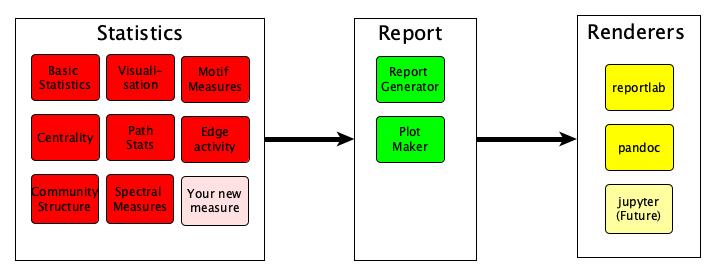
In essence nest performs 5 actions:
It processes tabular data into a (temporal) (un)weighted graph
It constructs a list of statistics, based on the data type.
It computes those statistics on the current set of data
It generates a report based on these statistics.
It renders these report in the required format.
In the next few sections we will discuss each of these sections in detail to allow others to extend our framework and add additional statistics.
Statistics
The graph statistics rely on a object orientated structure, which both allows nest to find all of the statistics, and subsequently the report_generator and renderer to produce a report based on these statistics.
Nest will import all statistics and then report all of the results using the output method selected. However, in order to do this the statistic need to meet a small number of requirements.
First, each of these statistics should be constructed as a class which must inherit from the baseStatClass class or in the case of a statistic which leverages a time series of graphs baseTimeSeriesStats.
Second, the class statistic should be named with underscores for spaces (rather than camelcase). Finally, each statistic must implement or inherit 3 methods,
def __init__(self, G, optionsDict):
This method takes either a single graph or a graph time series and compute the statistic in question
def get_report(self):
Returns the output of the statistic
def get_csv(self):
Returns the output of the statistic in the csv form
Note: the argument optionsDict allows us to pass options to each of the statistics, however please note that the same options will be passed to all methods, and therefore options should be placed in optionsDict[methodName][OPTIONNAME].
While this seems complex, in reality is due to inheritance it is very simple to add additional statistics, for example to add a statistic which computes the number of nodes:
class number_of_nodes(baseStatClass):
   def __init__(self, G, optionsDict):
      self.data = G.number_of_nodes()
Including Plots
For plots to be included in the output, the statistic should implement the makePlot method, with the following signature:
def makePlot(self):
This method should return a list of figure handles for each of the plots to be
added the report. Again, while this sounds complex, nest has several
helpful functions to make this easy. For example, to produce a histogram of a
statistic (say a centrality measure) we can inherit from the
baseWithHistPlot, and create an attribute called histdata which will
then be used to construct the histogram.
So for example to produce a plot with Eigenvector centrality, we would use the following code:
class Eigenvector(baseWithHistPlot):
   def __init__(self, G, optionsDict):
      q1 = nx.eigenvector_centrality_numpy(G)
      q2 = list(q1.values())
      self.data = __getStats__(q2)
      self.histData = q2
where the __getStats__ function constructs a small summary of the centrality scores.
For additional plots, we also provide a set of methods to produce plots which are in:
nest.reportgenerator.plot_maker
including lineplots, images or otherwise, or simply using the matplotlib and
seaborn libraries to return a list of figure handles for each required plot.
Time series statistics
Time series statistics are very similar to regular statistics, however they inherit from baseTimeSeriesStats rather than baseStatClass, and rather than an individual graph they take a dictionary of graphs where the keys are the time stamps.
Again, nest has implemented a large number of graph/network time series statistics although more could be added, and again we encourage others to include their statistics in our package.
nest also makes it very easy to turn graph/network statistics into a time
series statistic by simply computing the statistic on each element of the time
series and then producing a time series plot of the resultant statistic.
For example if we wanted to make a time series plot of the number of nodes
statistic we defined earlier, we can simply inherit from
baseTimeSeriesFromBase, which then will add all of the required methods to
compute the resultant statistic, as follows:
class number_of_nodes_TS(baseTimeSeriesFromBase):
   inbuiltMethod = number_of_nodes
This will then produce summaries of the resultant time series, as well as plots of the resultant time series.
Report and Renderer
The report and renderer modules convert the statistics into a report in the
required format. The work is divided between the modules as follows:
The report module is responsible for collating all of the statistics to run on the dataset in question,
and arranging the ordering of each of the outputs in the document. The logic to
do this is mostly included in nest.reportgenerator.report_generator.
In contrast the renderer takes the ordered output and then creates an
output in the correct format for this statistic. It does this using a similar
object orientated structure which allows us to change the renderer, without affecting any of the underlying logic.
If you wish to implement a new renderer, it must implement each of the required
methods the signatures of which can be found in nest.renderer.base.
Note, that some of the methods may be inappropriate for your particular renderer (i.e. a pagebreak),
in this case simply implement a blank method e.g.:
def addPageBreak(self):
  pass